
N8N Workflow Automation: A Plain-English Guide for Business Owners
If you have heard of Zapier or Make, n8n does a similar thing – it connects your apps and automates repetitive tasks between them. But it does it differently, and for growing businesses, the difference matters.
Zapier charges per task execution, which becomes expensive at scale. n8n can be self-hosted – meaning you run it on your own server – which removes the per-execution cost entirely. For businesses running thousands of automated tasks per month, this alone makes n8n dramatically more cost-effective.
Beyond cost, n8n handles more complex logic than most no-code automation tools. Conditional branches, loops, error handling, custom code execution, database queries – the workflows you can build go significantly further than what Zapier supports without custom workarounds.
What n8n Actually Does
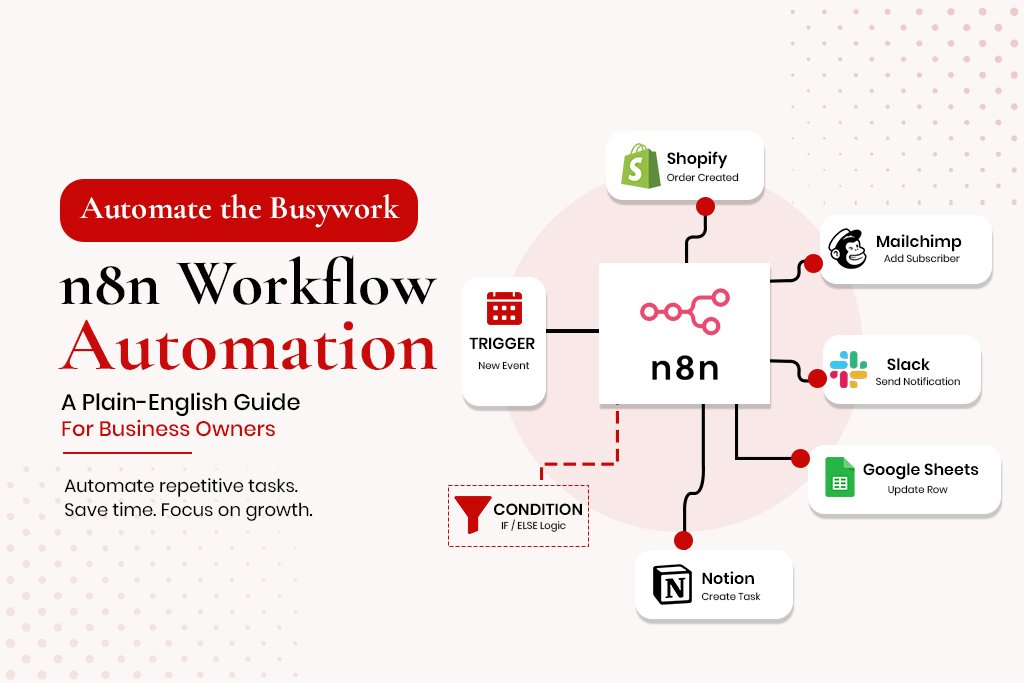
n8n is a workflow automation platform. You build workflows by connecting nodes – each representing either a trigger or an action. Connect them in sequence, and the workflow runs automatically whenever the trigger fires.
A simple example: when a new order comes into Shopify, n8n adds the customer’s email to a Klaviyo list and creates a task in your project management tool. A more complex example: when a lead submits your contact
form, n8n checks whether the email domain matches known competitors, and routes the lead accordingly with different follow-up sequences based on that check.
n8n vs Zapier vs Make – When to Use Each
| n8n | Zapier | Make | |
| Pricing model | Free (self-hosted) or ~$20/mo cloud | $20-$100+/mo, per task | $10-$65+/mo, per operation |
| Scale cost | Low – fixed regardless of volume | High – grows with volume | Medium – operation caps |
| Complexity | High – conditional logic, loops, custom code | Low-medium | Medium |
| Self-hosting | Yes – full data control | No | No |
| Best for | Complex, high volume, data-sensitive | Simple, low-volume | Mid-complexity |
5 Workflows Worth Building in n8n This Week
Workflow 1: Lead Qualification and CRM Entry
Trigger: new contact form submission. n8n checks for duplicates, assigns a lead score, routes high-score leads to a ‘hot leads’ pipeline, sends an acknowledgement email, and creates a follow-up task due within 2 hours. This replaces a process that typically takes 15-30 minutes per lead manually.
Workflow 2: eCommerce Order to Fulfilment Pipeline
Trigger: new paid order. n8n pulls order details, adds the customer to Klaviyo, creates a fulfilment task, checks inventory and sends low-stock alerts, and logs the order for finance – moving data between four systems simultaneously.
Workflow 3: Social Proof Collection
Trigger: order marked delivered (14 days later). n8n sends a review request, logs interactions, sends a thank-you on review submission, and follows up with an incentive if no review after 7 days.
Workflow 4: Internal Reporting Dashboard
Trigger: every Monday at 8am. n8n pulls the previous week’s data from Shopify, Klaviyo and Google Analytics, formats it, and sends a summary to Slack or email – replacing 30-45 minutes of manual data pulling weekly.
Workflow 5: Customer Support Triage
Trigger: new support ticket. n8n reads the content for urgency keywords, checks if the sender is high-value in the CRM, and routes accordingly – faster response times for the customers who matter most.
How to Set Up Your First n8n Workflow
Step 1: Create an account at n8n.io. Start with the cloud trial.
Step 2: Click New Workflow. You will see an empty canvas.
Step 3: Add a trigger node and search for your first app.
Step 4: Configure the trigger – select which event starts the workflow.
Step 5: Add an action node – what should happen next.
Step 6: Map the data fields from the trigger into the action.
Step 7: Test the workflow with a sample event.
Step 8: Activate the workflow.
When to Build It Yourself vs Hire an n8n Expert
Build it yourself if the workflow is simple, you have time to learn the interface, and the consequence of failure is low. Hire someone if the workflow is business-critical, involves sensitive data, has complex branching logic, or will run at high volume.
Frequently Asked Questions
Is n8n free?
The self-hosted version is free and open source. You pay only for server hosting, $5-$20/month for a basic VPS. Cloud-hosted starts around $20/month.
Do I need to know how to code to use n8n?
No, for most workflows. n8n’s visual interface handles data mapping without code. Advanced use cases benefit from basic JavaScript knowledge via the Function node.
How is n8n different from Zapier?
Main differences: cost at scale (n8n self-hosted is free regardless of volume), complexity ceiling (n8n handles far more complex logic), and data control.
Can n8n connect to any app?
n8n has native integrations with over 400 apps. The HTTP Request node connects to any app with a REST API – the vast majority of modern business software.