

How Email Marketing Automation Increases Ecommerce Revenue (With Real Numbers)
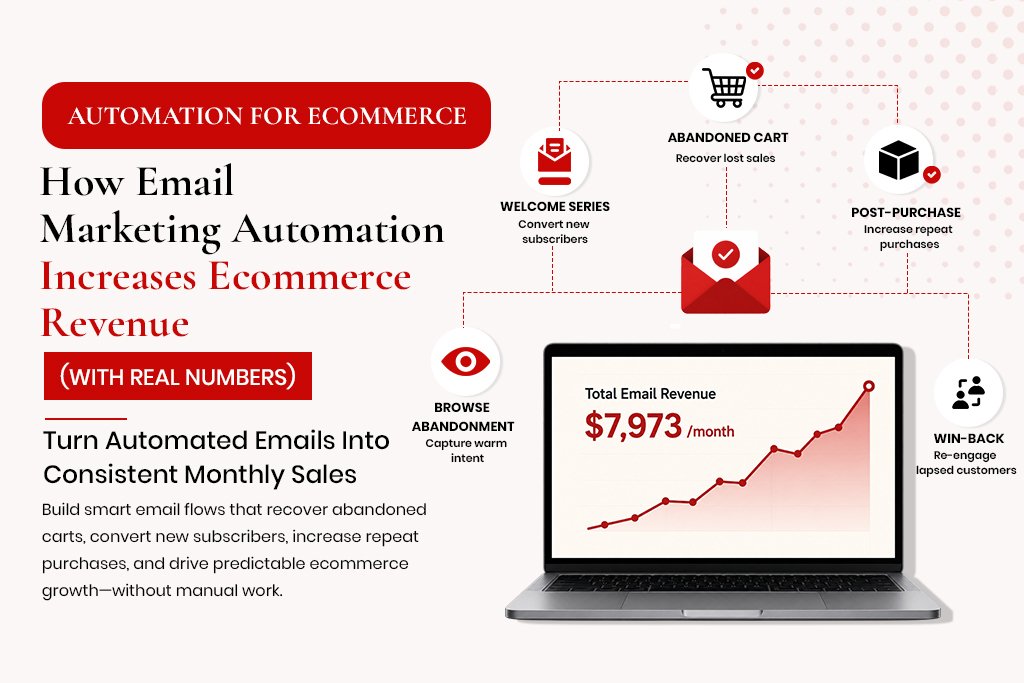
How Email Marketing Automation Increases Ecommerce Revenue (With Real Numbers) Email marketing has a reputation as an older channel – something businesses do because they always have, not because it is the highest-performing option available. That reputation is wrong. Email’s average ROI of $40 for every $1 spent consistently outperforms paid social, paid search and display advertising. The reason is not the channel itself – it is the automation that makes the channel work without requiring constant human effort. An email blast sent to a full list on a Tuesday is not email marketing automation. Automation is a system that sends the right email to the right person at the right moment based on what that person actually did – and does it without anyone pressing send. How Ecommerce Email Automation Works Email automation is event-driven. An event – a customer action or a time-based condition – triggers a flow. The flow sends a sequence of emails at predetermined intervals, with conditions that adjust based on the customer’s ongoing behaviour. Example: a customer views a pair of trainers three times over two days, adds them to cart, then closes the browser. A properly configured system triggers a browse abandonment flow after the views, and an abandoned cart flow after the cart addition and abandonment – tailored to specific behaviour rather than a generic newsletter. The 5 Flows That Drive 80% of Automated Email Revenue 1. Abandoned Cart – The Highest Revenue Flow Between 70-80% of shopping carts are abandoned before purchase. A meaningful percentage abandoned because of a distraction or hesitation – recoverable revenue. A well-structured flow (three emails: 1 hour, 24 hours, 72 hours) typically recovers 5-15% of abandoned cart revenue. For a store with $80 AOV and 300 abandonment events monthly, that is 15-45 recovered orders – $1,200-$3,600 in monthly revenue running automatically. Keys to performance: show the specific products left in cart, send the first email within 1 hour, avoid a discount in the first email (it trains customers to abandon for discounts), and make the CTA impossible to miss. 2. Welcome Series – Your Highest-Engagement Opportunity Open rates for welcome emails average 50-60%, more than double standard campaigns. Welcome series typically generate 3-5% of total email revenue. For a store adding 500 subscribers monthly with a 10% first-purchase rate at $80 AOV, that is 50 sales monthly – $4,000 in attributed revenue. 3. Post-Purchase – Retention and Repeat Orders Acquiring a new customer costs 5-7x more than retaining an existing one. A review request sent 10-14 days after delivery generates better reviews than one sent at purchase. Stores implementing post-purchase automation see 20-30% improvement in 90-day repeat purchase rates. 4. Browse Abandonment – Catching Warm Intent A visitor viewing a product multiple times signals intent without adding to cart. A single email sent 4-6 hours after the session catches a meaningful percentage of warm-intent visitors, complementing cart abandonment recovery. Conversation with Gemini transcript this text SEO Implications of Each Choice Does the site produce clean, semantic HTML with proper heading hierarchy? Both can – both can also fail. Are meta tags, canonicals and schema implemented correctly? WordPress with Rank Math makes this easy; custom sites need explicit implementation. Does the site achieve good Core Web Vitals? Performance depends on implementation quality, not the platform. Is content manageable without developer involvement? WordPress wins here for most teams. The SEO risk is in poor implementation on either platform, not the platform choice itself. The Decision Framework Choose WordPress If: Non-technical team members will manage content Budget is under $15,000 for initial development Functionality requirements are standard You want flexibility to work with any WordPress developer now this Choose Custom Development If: The site is a web application with complex functionality CMS plugins cannot handle Maximum performance is required The data architecture is too complex for WordPress’s conventions You have an in-house team to maintain the codebase Frequently Asked Questions Can WordPress be as fast as a custom site? Yes, with a lightweight theme, caching plugin, fast host, locally hosted fonts, minimal plugins and optimised images – a well-built WordPress site can score 90+ on mobile PageSpeed. Is WordPress good for SEO? Yes, with Rank Math or Yoast configured correctly. The SEO capability is in the configuration, not the platform itself. What does a WordPress SEO development project involve? Architecture planning, theme selection or custom development, Rank Math configuration, schema implementation, Core Web Vitals optimisation, and sitemap setup. now this How Email Marketing Automation Increases Ecommerce Revenue (With Real Numbers) Email marketing has a reputation as an older channel – something businesses do because they always have, not because it is the highest-performing option available. That reputation is wrong. Email’s average ROI of $40 for every $1 spent consistently outperforms paid social, paid search and display advertising. The reason is not the channel itself – it is the automation that makes the channel work without requiring constant human effort. An email blast sent to a full list on a Tuesday is not email marketing automation. Automation is a system that sends the right email to the right person at the right moment based on what that person actually did – and does it without anyone pressing send. How Ecommerce Email Automation Works Email automation is event-driven. An event – a customer action or a time-based condition – triggers a flow. The flow sends a sequence of emails at predetermined intervals, with conditions that adjust based on the customer’s ongoing behaviour. Example: a customer views a pair of trainers three times over two days, adds them to cart, then closes the browser. A properly configured system triggers a browse abandonment flow after the views, and an abandoned cart flow after the cart addition and abandonment – tailored to specific behaviour rather than a generic newsletter. now this The 5 Flows That Drive 80% of Automated Email Revenue 1. Abandoned Cart – The Highest Revenue Flow Between 70-80% of shopping carts are abandoned before purchase. A meaningful
N8N Workflow Automation: A Plain-English Guide for Business Owners
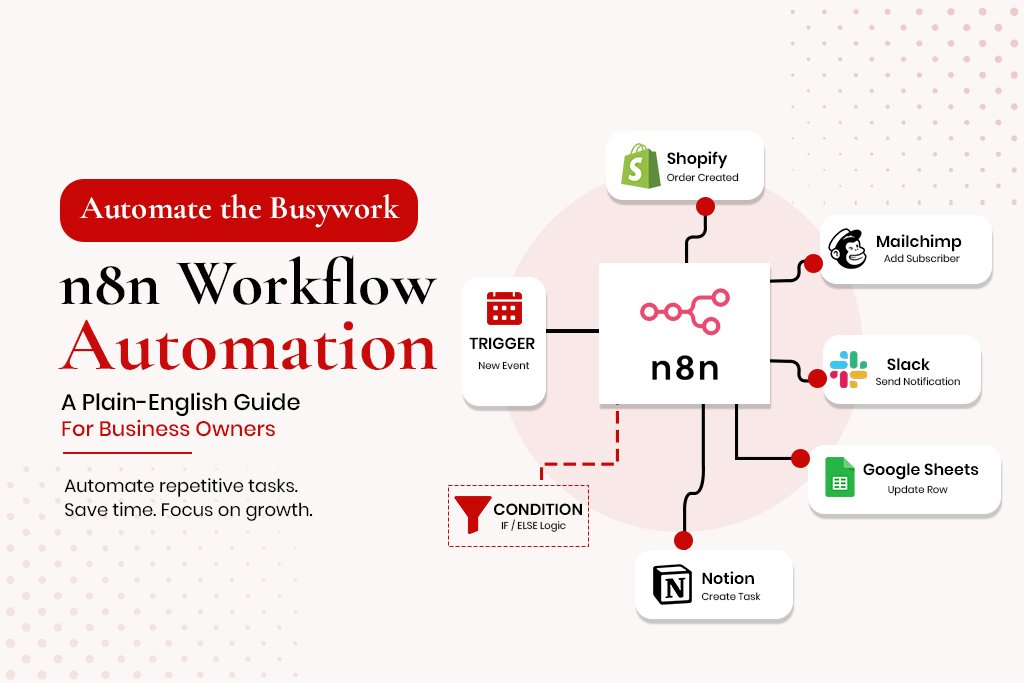
N8N Workflow Automation: A Plain-English Guide for Business Owners If you have heard of Zapier or Make, n8n does a similar thing – it connects your apps and automates repetitive tasks between them. But it does it differently, and for growing businesses, the difference matters. Zapier charges per task execution, which becomes expensive at scale. n8n can be self-hosted – meaning you run it on your own server – which removes the per-execution cost entirely. For businesses running thousands of automated tasks per month, this alone makes n8n dramatically more cost-effective. Beyond cost, n8n handles more complex logic than most no-code automation tools. Conditional branches, loops, error handling, custom code execution, database queries – the workflows you can build go significantly further than what Zapier supports without custom workarounds. What n8n Actually Does n8n is a workflow automation platform. You build workflows by connecting nodes – each representing either a trigger or an action. Connect them in sequence, and the workflow runs automatically whenever the trigger fires. A simple example: when a new order comes into Shopify, n8n adds the customer’s email to a Klaviyo list and creates a task in your project management tool. A more complex example: when a lead submits your contact form, n8n checks whether the email domain matches known competitors, and routes the lead accordingly with different follow-up sequences based on that check. n8n vs Zapier vs Make – When to Use Each n8n Zapier Make Pricing model Free (self-hosted) or ~$20/mo cloud $20-$100+/mo, per task $10-$65+/mo, per operation Scale cost Low – fixed regardless of volume High – grows with volume Medium – operation caps Complexity High – conditional logic, loops, custom code Low-medium Medium Self-hosting Yes – full data control No No Best for Complex, high volume, data-sensitive Simple, low-volume Mid-complexity 5 Workflows Worth Building in n8n This Week Workflow 1: Lead Qualification and CRM Entry Trigger: new contact form submission. n8n checks for duplicates, assigns a lead score, routes high-score leads to a ‘hot leads’ pipeline, sends an acknowledgement email, and creates a follow-up task due within 2 hours. This replaces a process that typically takes 15-30 minutes per lead manually. Workflow 2: eCommerce Order to Fulfilment Pipeline Trigger: new paid order. n8n pulls order details, adds the customer to Klaviyo, creates a fulfilment task, checks inventory and sends low-stock alerts, and logs the order for finance – moving data between four systems simultaneously. Workflow 3: Social Proof Collection Trigger: order marked delivered (14 days later). n8n sends a review request, logs interactions, sends a thank-you on review submission, and follows up with an incentive if no review after 7 days. Workflow 4: Internal Reporting Dashboard Trigger: every Monday at 8am. n8n pulls the previous week’s data from Shopify, Klaviyo and Google Analytics, formats it, and sends a summary to Slack or email – replacing 30-45 minutes of manual data pulling weekly. Workflow 5: Customer Support Triage Trigger: new support ticket. n8n reads the content for urgency keywords, checks if the sender is high-value in the CRM, and routes accordingly – faster response times for the customers who matter most. How to Set Up Your First n8n Workflow Step 1: Create an account at n8n.io. Start with the cloud trial. Step 2: Click New Workflow. You will see an empty canvas. Step 3: Add a trigger node and search for your first app. Step 4: Configure the trigger – select which event starts the workflow. Step 5: Add an action node – what should happen next. Step 6: Map the data fields from the trigger into the action. Step 7: Test the workflow with a sample event. Step 8: Activate the workflow. When to Build It Yourself vs Hire an n8n Expert Build it yourself if the workflow is simple, you have time to learn the interface, and the consequence of failure is low. Hire someone if the workflow is business-critical, involves sensitive data, has complex branching logic, or will run at high volume. Frequently Asked Questions Is n8n free? The self-hosted version is free and open source. You pay only for server hosting, $5-$20/month for a basic VPS. Cloud-hosted starts around $20/month. Do I need to know how to code to use n8n? No, for most workflows. n8n’s visual interface handles data mapping without code. Advanced use cases benefit from basic JavaScript knowledge via the Function node. How is n8n different from Zapier? Main differences: cost at scale (n8n self-hosted is free regardless of volume), complexity ceiling (n8n handles far more complex logic), and data control. Can n8n connect to any app? n8n has native integrations with over 400 apps. The HTTP Request node connects to any app with a REST API – the vast majority of modern business software.
Klaviyo Email Automation: The Complete Setup Guide for Ecommerce Brands
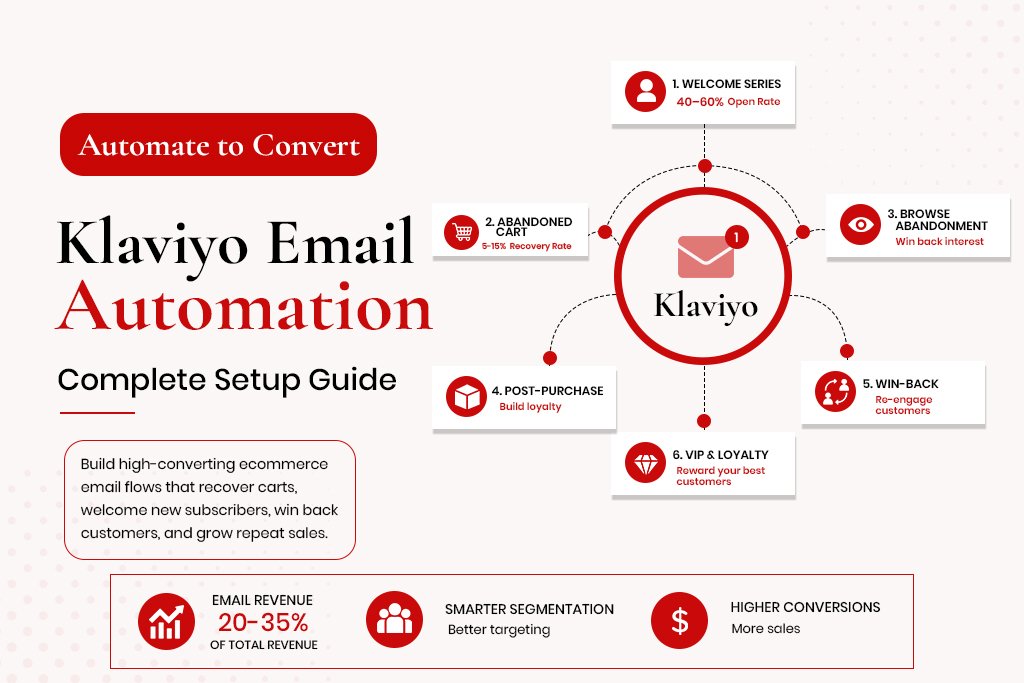
Klaviyo Email Automation: The Complete Setup Guide for Ecommerce Brands Email is the highest-ROI marketing channel available to ecommerce brands. The average return is $40 for every $1 spent – higher than paid social, higher than paid search, higher than influencer marketing. But that return does not come from sending a newsletter once a month. It comes from building automated flows that work continuously, triggering at the right moment based on what a customer actually did. Klaviyo is the tool that makes this possible for Shopify and WooCommerce stores. It integrates directly with your store, syncs customer data in real time, and allows you to build automation sequences based on behaviour – not just email list status. This guide covers Klaviyo account setup, the six essential flows every store needs, the specific configuration of the most important one (abandoned cart), segmentation strategy, and the metrics that actually tell you whether the system is working. Why Klaviyo Outperforms Other Email Platforms for Ecommerce Native Shopify and WooCommerce integration – syncs order data, product data and customer behaviour in real time Behavioural triggers – flows can be triggered by viewing a product, starting checkout, completing a purchase, reaching a spend threshold Predictive analytics – calculates each customer’s predicted lifetime value and next order date Revenue attribution – attributes email revenue to specific flows and campaigns Advanced segmentation – segments update dynamically based on real-time data Klaviyo Account Setup – The Right Way Integrate With Your Store Connect Klaviyo to Shopify or WooCommerce via the native integration. This syncs your product catalogue, order history, customer data and browsing behaviour. Set Up Your Sending Domain Before sending a single email, authenticate your sending domain with DKIM, SPF and DMARC DNS records. Without authentication, your emails land in spam at a significantly higher rate. Warm Up Your Domain If moving from another platform or starting fresh, do not immediately send to your full list. Start with your most engaged subscribers and gradually expand volume over 4-6 weeks. Set Up Your Lists and Segments Core lists: Newsletter subscribers, Customer list. Core segments: Active customers (purchased in last 180 days), Lapsed customers (181-365 days), Win-back targets (over 365 days), High-value customers, Flow suppression list. The 6 Essential Klaviyo Flows Flow 1: Welcome Series Triggered when someone subscribes for the first time. Open rates on welcome emails are typically 40-60%, compared to 20-25% for standard campaigns. Email 1 (immediately): Warm welcome, deliver any offered discount or lead magnet Email 2 (24-48 hours): Bestsellers, light social proof, one clear CTA Email 3 (3-4 days): Address the most common objection before buying Email 4 (5-7 days): Stronger offer or social proof Flow 2: Abandoned Cart The highest-revenue flow for most stores. The average recovery rate from a well-structured flow is 5-15% of abandoned checkouts. Email 1 (1 hour): Reminder with dynamic product blocks showing actual items left in cart Email 2 (24 hours): Social proof on the abandoned product, reviews Email 3 (72 hours): Final reminder with a small incentive – free shipping or 10% off The 1-hour timing on Email 1 is important. Recovery rates drop significantly when delayed to 2-4 hours. Flow 3: Browse Abandonment Triggered when a visitor views a product page but does not add to cart. A single email sent 4-6 hours after browsing, showing the viewed product with social proof, recovers visitors who were interested but not ready. Flow 4: Post-Purchase Series Email 1 (immediate): Order confirmation Email 2 (delivery day): Delivery check-in, satisfaction touchpoint Email 3 (7-14 days): Request for a review Email 4 (30-45 days): Cross-sell based on what they bought Flow 5: Win-Back Campaign Email 1: ‘We miss you’ personalised with their last purchase Email 2: Incentive – free shipping, discount, early access Email 3: Final goodbye – this reverse psychology email often outperforms the incentive email Flow 6: VIP and Loyalty Tier Once you have 6-12 months of purchase data, segment your top customers by lifetime value and treat them differently with early access and exclusive discounts. Klaviyo Segmentation Strategy Champions: purchased 3+ times in last 90 days, high AOV Loyal customers: purchased 2-3 times, last purchase within 180 days At-risk: were active, last purchase 180-270 days ago Lost: no purchase in 365+ days, low engagement High-intent browsers: visited 3+ product pages in 7 days, no purchase New to brand: subscribed in last 30 days, no purchase The Metrics That Tell You if Klaviyo Is Working Revenue attributed to Klaviyo – should be 20-35% of total store revenue for a well-configured account Flow revenue vs campaign revenue split – flows should generate more revenue than campaigns Abandoned cart recovery rate – target 5-15% List health – if more than 30% of your list is unengaged, deliverability will suffer Frequently Asked Questions How long does it take to set up Klaviyo properly? A basic setup takes 8-12 hours of focused work. A full six-flow system with segmentation takes 20-30 hours. Do I need all six flows from day one? No. Start with welcome series and abandoned cart. Add browse abandonment and post-purchase next. How do I avoid triggering spam filters? Authenticate your sending domain, warm up before sending large volumes, maintain a clean list, keep complaint rate below 0.08%. Can Klaviyo work for a B2B ecommerce store? Yes, but the flow structure is different – longer purchase cycles and larger orders change the timing and messaging.