
How to Improve Your Shopify Conversion Rate: 11 Fixes That Actually Work

— And What Actually Fixes It

Learn 11 proven fixes to improve your Shopify conversion rate, optimize Core Web Vitals, and achieve sub-2-second load times.

How to Improve Your Shopify Conversion Rate: 11 Fixes That Actually Work

How to Improve Your Shopify Conversion Rate: 11 Fixes That Actually Work

The average Shopify store converts between 1.2% and 2.5% of its visitors. That means 97-99% of the people landing on your store leave without buying anything. Getting more traffic to a store that converts at 1% is an expensive way to solve a problem that better conversion rate optimisation would fix for a fraction of the cost.

CRO – conversion rate optimisation – is the discipline of making your existing traffic work harder. Instead of spending more to acquire more visitors, you focus on removing the reasons why current visitors are not buying. Doubling your conversion rate from 1% to 2% doubles your revenue from the same traffic.

These 11 fixes are drawn from real Shopify CRO audits, ranked roughly by impact-to-effort ratio.

Fix 1: Restructure Your Product Page Hierarchy

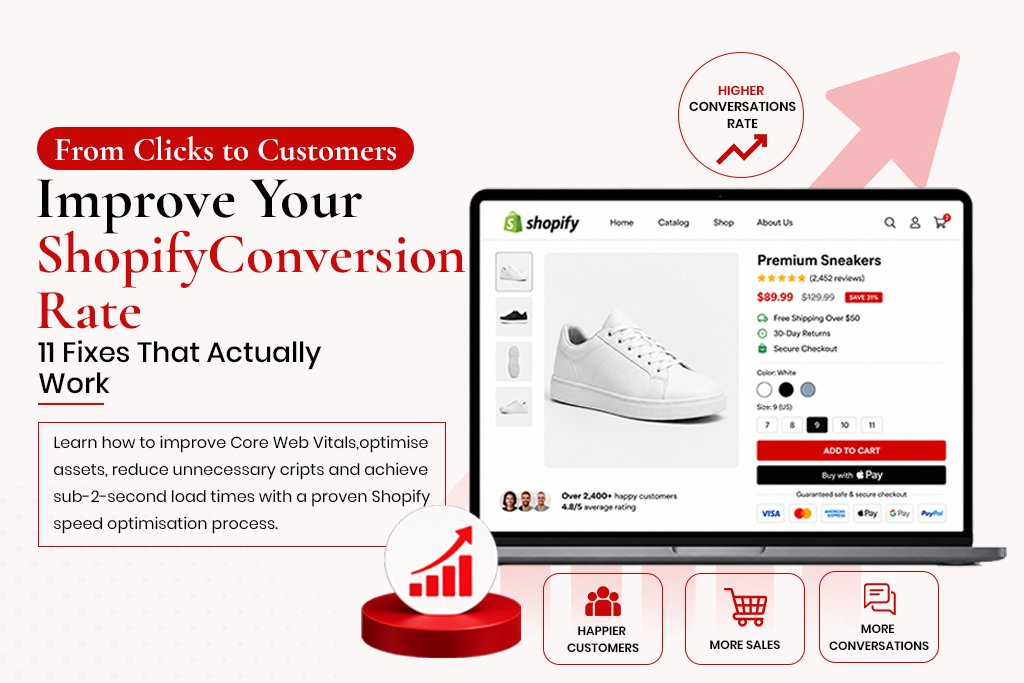
The most common product page layout problem is burying the purchase decision below the fold. Visitors need to see the product name, price, key benefit and add-to-cart button without scrolling. On mobile, that space is limited – every element above the buy button is costing you.

The correct hierarchy above the fold: large product image, product name (H1), price, key variant selectors, and the add-to-cart button. Everything else – description, specs, reviews, related products – goes below the fold.

Fix 2: Add Trust Signals Above the Fold

Visitors who do not know your brand need a reason to trust you before handing over payment details. The most effective trust signals are:

  • Star rating with review count displayed directly below the product name

  • Short trust badges near the add-to-cart button: secure checkout, 30-day returns, free shipping

  • Payment method icons below the add-to-cart button

  • A short social proof statement: ‘Over 2,400 customers’ or ‘Featured in [publication]’

Fix 3: Fix Your Image Load Time

Shopify product images are often uploaded at the original camera resolution – files of 6-8MB. Every product image should be exported at the display resolution you actually use and converted to WebP before uploading. The difference between a 6MB PNG and a 180KB WebP shows up directly in your LCP score and load time.

Fix 4: Fix the Cart Abandonment Leak

The average cart abandonment rate across ecommerce is 70-75%. A significant portion of that is caused by friction you can remove:

  • Unexpected costs at checkout – show shipping costs on the cart page, not only at checkout

  • Mandatory account creation – allow guest checkout

  • Too many checkout steps – Shopify’s one-page checkout reduces friction significantly

  • Payment method mismatch – offer Apple Pay or Klarna if your audience expects them

Fix 5: Simplify the Checkout

Only ask for information you actually need: name, shipping address, email, payment details. Shopify’s built-in checkout is already well-optimised – the common mistakes happen when merchants add custom fields, surveys or upsell interstitials that interrupt the flow.

Fix 6: Implement Review Schema

Reviews improve conversion directly through social proof. Review schema also adds star ratings to your product’s appearance in Google search results, attracting more clicks even before the visitor lands on the page. On Shopify, apps like Okendo, Stamped or Judge.me handle this.

Fix 7: Improve Mobile Navigation

Common problems include hamburger menus too small to tap accurately, mega menus that collapse poorly on mobile, no sticky header, and missing breadcrumbs. Walk through your store on a real phone as if you were a first-time customer and note every point of confusion.

Fix 8: Add Urgency Mechanics – But Only Real Ones

Fake countdown timers no longer work – visitors have learned to dismiss them. Real urgency mechanics that work: accurate low stock indicators, real sale end dates, genuine seasonal relevance, and back-in-stock notifications that capture email.

Fix 9: Rewrite Your CTA Copy

‘Add to Cart’ is fine as a default, but on landing pages and bundle offers, benefit-oriented CTAs like ‘Get My Kit’ or ‘Claim My Discount’ often outperform generic ones. Test changes using Shopify’s built-in A/B testing or Google Optimize, running for at least two weeks for statistical significance.

Fix 10: Improve Internal Search

For stores with large catalogues, internal search is often the highest-intent journey a visitor takes. Apps like Searchie, Boost Commerce or SearchPie improve search quality significantly over Shopify’s default.

Fix 11: Run Heatmap Analysis

Heatmap tools like Hotjar or the free Microsoft Clarity show exactly where visitors click, how far they scroll and where they exit. Watch recordings of mobile visitors on your top product pages for confusion patterns – tapping non-clickable elements, scrolling back up, long pauses before exiting.

Measuring the Results of CRO Work

Track conversion rate weekly in Shopify Analytics under ‘Online store conversion rate.’ Do not make multiple changes simultaneously – roll out fixes one at a time so you know which change caused which result.

Frequently Asked Questions

What is a good Shopify conversion rate?

The industry average sits between 1.2% and 2.5%. Top-performing stores achieve 3-5%+. If your store is below 1%, technical or trust issues are likely suppressing conversions.

How quickly do CRO improvements show results?

Some changes show results within days. Others require 2-4 weeks of data for statistically valid conclusions. CRO is not a one-time project – the best-converting stores run continuous testing cycles.

Does CRO affect SEO?

Yes, positively. Improvements that reduce bounce rate and improve Core Web Vitals send positive behavioural signals to Google.

Should I hire a Shopify CRO agency or do it myself?

The basics here are DIY-friendly. The testing and analysis side benefits significantly from experience. A professional audit typically identifies 10-20 specific issues prioritised by impact, a faster starting point than working through everything from scratch.


Ready to grow your business online?

Get a free discovery call with M. Abbas and build your growth system.

|

In this article

01 Why traffic isn't the problem

02 The real cause: bad infrastructure

03 Schema & internal linking

04 The fix: build around growth

|

Our services

Trusted by 700+ clients

Upwork ★ Top Rated

5/5 Rating

Ma

M. Abbas
Founder & Growth Strategist

Founder of MrTechnomide. Builds SEO-driven websites and automation systems that generate real business growth — not just traffic.

relative post

Infographic showing a digital growth strategy for small businesses, featuring a staircase with steps for building a strong foundation, engaging and nurturing customers, increasing visibility, and achieving sustainable growth, with a laptop displaying analytics.
case studies

Digital Growth Strategy for Small Businesses: A Practical, No-Fluff Roadmap

Digital Growth Strategy for Small Businesses: A Practical, No-Fluff Roadmap ‘Digital growth strategy’ sounds like something large companies hire consultants to produce in 80-page decks. In practice, it is a simpler question: what is the most effective way to use digital channels to grow this specific business? The answer is different for every business. A local service business and a direct-to-consumer ecommerce brand have very different growth levers. But the framework for identifying the right approach and executing it consistently is the same. Why Most Small Business Digital Growth Strategies Fail The most common failure is lack of sequencing – businesses try website, paid ads, daily social posting, a podcast and SEO all simultaneously, spreading budget and attention across six channels and producing mediocre results everywhere. The second is building on an unstable foundation – starting ads before the website converts, building an email list before there is anything worth sending, investing in content before the technical SEO infrastructure can help it rank. The third is choosing the wrong primary channel. A B2B professional services firm does not grow through TikTok. Matching the channel to the business model is a decision that gets made wrong more often than it should. The Three Foundations Every Business Needs First Foundation 1: A Website That Converts A visitor should understand within 5 seconds what you do, who for, and what to do next. Common killers: unclear value proposition above the fold, no social proof, no direct call to action, load times over 4 seconds on mobile. Fix the website first – every channel drives traffic back to it. Foundation 2: An SEO Infrastructure SEO takes time to compound, which is exactly why it needs to start early. Clean architecture, proper meta tags, schema, a submitted sitemap and passing Core Web Vitals create the conditions for compounding organic growth over 12-24 months. Waiting until you ‘need SEO’ puts you 6-12 months behind where you could be. Foundation 3: A Basic Email Capture and Nurture System Every visitor who leaves without buying is potentially lost. An email capture system with an automated welcome sequence converts some of that traffic into future customers. The email list is the only audience you own – social reach depends on algorithms, paid traffic stops when budget stops. Here is the complete transcription of the text from the image, organized exactly as it appears: Choosing Your Primary Growth Channel Business Type Best Primary Channel Secondary Channel Avoid Early eCommerce (impulse, low AOV) Paid Social SEO + Email Automation Podcast, LinkedIn eCommerce (considered, high AOV) SEO + Content Email Automation Impulse-driven social Local Service Business Google Business + Local SEO Paid Search Broad social media B2B Professional Services LinkedIn + Content SEO Email Outreach Paid Social, TikTok SaaS / Digital Product SEO + Content Paid Search + Email Broad social media The 12-Month Practical Roadmap Months 1-2: Fix the Foundation Website: fix conversion issues, mobile speed under 3 seconds, one clear CTA per page SEO: install Rank Math, set up Search Console, submit sitemap, fix crawl errors Email: set up your platform, add an opt-in form, write a 3-email welcome sequence Analytics: confirm GA4 tracking and set up conversion goals Here is the transcription of the text from the second image, continuing the roadmap structure: Months 3-4: Add Content and Visibility Publish two blog posts monthly targeting keywords customers actually search Claim and optimise Google Business Profile if serving local customers Begin link building – guest posts, directories, supplier or partner links Months 5-8: Scale What Is Working Review GA4 and Search Console data, invest more in what is gaining traction Add browse abandonment and post-purchase flows if running ecommerce automation Test paid search or paid social in a focused way – one campaign, one audience Months 9-12: Compound and Optimise Organic traffic from month 3 work should now be measurable and growing Automate manual tasks – lead follow-up, reporting, onboarding Review the full 12 months and base next year’s decisions on this year’s evidence Setting Realistic Growth Milestones Organic traffic: 3-6 months before meaningful growth, 9-12 months before it is a significant channel Paid advertising: measurable results within 30-60 days with good creative and targeting Email: the path from 0 to 1,000 subscribers is typically 6-12 months without a large existing audience CRO: results often immediate, but need sufficient traffic to be statistically meaningful Here is the transcription of the text from the third image: The One Thing That Matters More Than Everything Else Consistency. Businesses that fail at digital growth almost always stop before the compounding effect becomes visible – eight blog posts with no traffic and they stop, three weeks of ads with poor ROAS and they stop. Digital growth channels reward persistence disproportionately. Choose a level of activity you can sustain for 24 months – two blog posts monthly for two years beats twelve posts in month one and silence after. Frequently Asked Questions How much should a small business spend on digital marketing? A common benchmark is 5-10% of annual revenue. For a business doing $500K annually, that is $25-50K per year, split based on evidence of what is working rather than equally across channels. Should I do SEO or paid ads first? Both serve different time horizons. Paid ads produce revenue in 30 days; SEO cannot. SEO needs to start now because it takes 6-9 months to compound. Most growing businesses run both. Here is the transcription of the final section from the fourth image: Do I need a digital marketing agency or can I do it myself? Foundations are manageable solo if you have time to learn them. Ongoing execution – content, ad optimisation, link building, technical maintenance – is where an experienced specialist produces better results faster than a generalist working part-time. What is the difference between digital marketing and digital growth? Digital marketing is execution of specific tactics. Digital growth is the connected strategy tying those tactics into a system oriented toward a specific business outcome.

Read More »
A comparison infographic titled "Artboard 11.jpg" contrasting Shopify Plus and Standard Shopify, highlighting key differences like custom checkout, B2B features, multi-store management, and automation for business growth.
shopify

Shopify Plus vs Standard Shopify: Which One Is Right for Your Business

Shopify Plus vs Standard Shopify: Which One Is Right for Your Business Shopify Plus is the enterprise version of Shopify. It is significantly more expensive than standard Shopify plans, and the additional capabilities only become valuable at a specific scale. This guide covers what you actually get, when the upgrade makes commercial sense, and what Shopify Plus development involves compared to standard Shopify. What Shopify Plus Actually Includes Shopify Plus pricing starts at $2,300 per month versus standard plans starting at $39. That is a significant step up, worth understanding specifically. Custom Checkout Standard Shopify’s checkout structure is fixed beyond colours and a logo. Plus gives access to checkout.liquid (or checkout extensibility), allowing full customisation – custom layouts, additional fields, upsell offers within checkout, custom validation. Shopify Flow A no-code automation tool built into Plus. Tag high-value customers automatically, flag orders for review based on risk score, send internal notifications – reducing operational overhead for high order volumes. Launchpad Schedules automated changes at specific times – price changes for flash sales, theme changes for campaigns – removing the operational stress of manual midnight changes. Multi-Store Management Up to 10 store instances under one Plus organisation, enabling separate storefronts for regions or brands managed from a single admin interface. B2B Features Company accounts, buyer roles, custom pricing by account, purchase order payment terms and draft order approval workflows – managing both consumer and trade channels from one platform. Higher API Rate Limits Standard Shopify allows 2 API calls per second; Plus allows 4. This matters for complex integrations and high-volume order processing. Dedicated Support A dedicated launch engineer during onboarding and priority support, genuinely valuable for complex migrations. When Shopify Plus Makes Commercial Sense Custom checkout is required – if checkout limitations are hurting conversion, this alone can justify the cost B2B sales are significant – Plus removes the need for a separate B2B solution International expansion requires multiple storefronts with local pricing and language High order volume is creating operational inefficiencies that Flow and Launchpad would automate API limitations are causing integration problems with ERP or inventory systems When Standard Shopify Is Sufficient Merchants doing up to $2-3 million annually rarely find standard Shopify’s feature set genuinely limiting. The jump to $2,300/month only makes commercial sense when the additional capabilities produce a clear return. Shopify Plus Development – What Is Involved Custom Checkout Development Checkout extensibility uses Shopify’s checkout UI extension framework – JavaScript-based components requiring familiarity with Shopify’s extension APIs and React. Shopify Functions Functions replace or extend backend logic – custom discount calculations, delivery customisations – written in WebAssembly via Rust or JavaScript, running on Shopify’s infrastructure. Theme Development Follows the same Online Store 2.0 principles as standard Shopify, with the added context of B2B-specific content and checkout integration. API and Integration Work Higher rate limits enable ERP connections, 3PL integrations and real-time inventory sync across multiple warehouses. Shopify Plus Timeline and Cost Expectations Project Timeline Cost Range Migration to Plus (same theme) 2-4 weeks $2,000-$6,000 Checkout customisation only 2-4 weeks $3,000-$8,000 Custom theme + checkout 8-14 weeks $15,000-$35,000 Full Plus build (B2B, multi-store, integrations) 14-24 weeks $35,000-$100,000+ Frequently Asked Questions At what revenue should I consider Shopify Plus? Not a revenue threshold – it depends on specific needs. The Plus cost of roughly $27,600/year makes financial sense when the features unlock a return exceeding that. This typically falls somewhere between $1-5 million in annual revenue, but specific requirements matter more than the number. Can I test Shopify Plus before committing? Shopify offers trial periods and demo environments. Worth testing checkout extensibility specifically before signing a Plus contract. Is Shopify Plus development more expensive than standard Shopify? Yes, by roughly 30-60% for equivalent scope, because Plus-specific work requires more specialised knowledge and higher testing complexity. Does Shopify Plus affect SEO? Not directly. SEO impact comes from the theme, technical implementation and content – the same considerations as standard Shopify.

Read More »
An infographic illustrating how email marketing automation for ecommerce recovers abandoned carts, converts new subscribers, and drives monthly revenue.
Automation

How Email Marketing Automation Increases Ecommerce Revenue (With Real Numbers)

How Email Marketing Automation Increases Ecommerce Revenue (With Real Numbers) Email marketing has a reputation as an older channel – something businesses do because they always have, not because it is the highest-performing option available. That reputation is wrong. Email’s average ROI of $40 for every $1 spent consistently outperforms paid social, paid search and display advertising. The reason is not the channel itself – it is the automation that makes the channel work without requiring constant human effort. An email blast sent to a full list on a Tuesday is not email marketing automation. Automation is a system that sends the right email to the right person at the right moment based on what that person actually did – and does it without anyone pressing send. How Ecommerce Email Automation Works Email automation is event-driven. An event – a customer action or a time-based condition – triggers a flow. The flow sends a sequence of emails at predetermined intervals, with conditions that adjust based on the customer’s ongoing behaviour. Example: a customer views a pair of trainers three times over two days, adds them to cart, then closes the browser. A properly configured system triggers a browse abandonment flow after the views, and an abandoned cart flow after the cart addition and abandonment – tailored to specific behaviour rather than a generic newsletter. The 5 Flows That Drive 80% of Automated Email Revenue 1. Abandoned Cart – The Highest Revenue Flow Between 70-80% of shopping carts are abandoned before purchase. A meaningful percentage abandoned because of a distraction or hesitation – recoverable revenue. A well-structured flow (three emails: 1 hour, 24 hours, 72 hours) typically recovers 5-15% of abandoned cart revenue. For a store with $80 AOV and 300 abandonment events monthly, that is 15-45 recovered orders – $1,200-$3,600 in monthly revenue running automatically. Keys to performance: show the specific products left in cart, send the first email within 1 hour, avoid a discount in the first email (it trains customers to abandon for discounts), and make the CTA impossible to miss. 2. Welcome Series – Your Highest-Engagement Opportunity Open rates for welcome emails average 50-60%, more than double standard campaigns. Welcome series typically generate 3-5% of total email revenue. For a store adding 500 subscribers monthly with a 10% first-purchase rate at $80 AOV, that is 50 sales monthly – $4,000 in attributed revenue. 3. Post-Purchase – Retention and Repeat Orders Acquiring a new customer costs 5-7x more than retaining an existing one. A review request sent 10-14 days after delivery generates better reviews than one sent at purchase. Stores implementing post-purchase automation see 20-30% improvement in 90-day repeat purchase rates. 4. Browse Abandonment – Catching Warm Intent A visitor viewing a product multiple times signals intent without adding to cart. A single email sent 4-6 hours after the session catches a meaningful percentage of warm-intent visitors, complementing cart abandonment recovery. Conversation with Gemini transcript this text SEO Implications of Each Choice Does the site produce clean, semantic HTML with proper heading hierarchy? Both can – both can also fail. Are meta tags, canonicals and schema implemented correctly? WordPress with Rank Math makes this easy; custom sites need explicit implementation. Does the site achieve good Core Web Vitals? Performance depends on implementation quality, not the platform. Is content manageable without developer involvement? WordPress wins here for most teams. The SEO risk is in poor implementation on either platform, not the platform choice itself. The Decision Framework Choose WordPress If: Non-technical team members will manage content Budget is under $15,000 for initial development Functionality requirements are standard You want flexibility to work with any WordPress developer   now this Choose Custom Development If: The site is a web application with complex functionality CMS plugins cannot handle Maximum performance is required The data architecture is too complex for WordPress’s conventions You have an in-house team to maintain the codebase Frequently Asked Questions Can WordPress be as fast as a custom site? Yes, with a lightweight theme, caching plugin, fast host, locally hosted fonts, minimal plugins and optimised images – a well-built WordPress site can score 90+ on mobile PageSpeed. Is WordPress good for SEO? Yes, with Rank Math or Yoast configured correctly. The SEO capability is in the configuration, not the platform itself. What does a WordPress SEO development project involve? Architecture planning, theme selection or custom development, Rank Math configuration, schema implementation, Core Web Vitals optimisation, and sitemap setup.   now this How Email Marketing Automation Increases Ecommerce Revenue (With Real Numbers) Email marketing has a reputation as an older channel – something businesses do because they always have, not because it is the highest-performing option available. That reputation is wrong. Email’s average ROI of $40 for every $1 spent consistently outperforms paid social, paid search and display advertising. The reason is not the channel itself – it is the automation that makes the channel work without requiring constant human effort. An email blast sent to a full list on a Tuesday is not email marketing automation. Automation is a system that sends the right email to the right person at the right moment based on what that person actually did – and does it without anyone pressing send. How Ecommerce Email Automation Works Email automation is event-driven. An event – a customer action or a time-based condition – triggers a flow. The flow sends a sequence of emails at predetermined intervals, with conditions that adjust based on the customer’s ongoing behaviour. Example: a customer views a pair of trainers three times over two days, adds them to cart, then closes the browser. A properly configured system triggers a browse abandonment flow after the views, and an abandoned cart flow after the cart addition and abandonment – tailored to specific behaviour rather than a generic newsletter.   now this The 5 Flows That Drive 80% of Automated Email Revenue 1. Abandoned Cart – The Highest Revenue Flow Between 70-80% of shopping carts are abandoned before purchase. A meaningful

Read More »
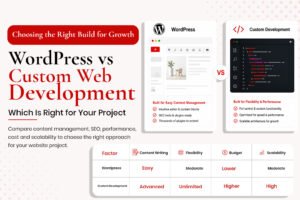
WordPress vs Custom Web Development comparison infographic showing features, content management, flexibility, cost, and scalability differences for website projects.
wordpress

WordPress vs Custom Web Development: Which Is Right for Your Project

WordPress vs Custom Web Development: Which Is Right for Your Project This question comes up in almost every new website project conversation. WordPress or custom? CMS or bespoke build? The honest answer depends on factors specific to your project, your team, your budget and your growth plans. This guide gives an honest framework for the decision, covers the SEO implications of each, and explains when the choice is obvious versus genuinely close. What WordPress Actually Is WordPress evolved from a blogging platform into a full content management system powering around 43% of the web. It is open source, free to use, and supported by a massive ecosystem of plugins, themes and developers. Major brands including media publications and large retailers run on WordPress – the platform scales further than most businesses will ever need. What Custom Web Development Actually Means Custom development means building a website without a pre-existing CMS framework – writing code from scratch or using a front-end framework like React or Next.js with a custom back-end. This gives complete control but means every aspect must be built and maintained by a developer. WordPress Advantages Content Management Without Developer Involvement Non-technical team members can add blog posts, update pages and manage content without touching code – the biggest practical advantage for most businesses. Plugin Ecosystem WooCommerce, Rank Math, WP Rocket, Gravity Forms – mature plugins exist for almost every requirement, usually faster to implement than custom-coded equivalents. SEO-Friendly by Default With the Right Setup WordPress with Rank Math configured correctly is a strong SEO platform – automatic sitemaps, meta tags, schema and canonical tags all handled by the plugin. Developer Availability and Cost The WordPress developer pool is vast, making handoffs easier. WordPress is typically cheaper to build and maintain than a fully custom equivalent. WordPress Disadvantages Performance Challenges WordPress sites are frequently slow, usually self-inflicted through page builders, too many plugins, unoptimised images and cheap hosting. Security Surface Area WordPress is the most targeted CMS for hackers because it is the most widely used. The vulnerability surface mostly comes from outdated or poorly maintained plugins. Plugin Dependency A site with 30 plugins has 30 potential points of failure. Good practice involves keeping the plugin count low and reviewing necessity regularly. Custom Development Advantages Performance Ceiling A well-built custom site on a modern framework can achieve performance that WordPress struggles to match consistently. No CMS Constraints No architectural limitations imposed by a framework – the database schema, URL structure and content types are entirely defined by the development team’s decisions. Security A smaller attack surface than WordPress since there are no third-party plugins of unknown code quality. Custom Development Disadvantages Cost and Time Functionality that takes a WordPress developer 2 hours with a plugin can take a custom developer 20 hours from scratch. Content Management Requires CMS Work Non-technical content management on a custom site needs a separate headless CMS layer, adding cost and complexity. Developer Lock-In A custom-built site is harder to hand off – new developers must learn the bespoke codebase before making changes safely. SEO Implications of Each Choice Does the site produce clean, semantic HTML with proper heading hierarchy? Both can – both can also fail. Are meta tags, canonicals and schema implemented correctly? WordPress with Rank Math makes this easy; custom sites need explicit implementation. Does the site achieve good Core Web Vitals? Performance depends on implementation quality, not the platform. Is content manageable without developer involvement? WordPress wins here for most teams. The SEO risk is in poor implementation on either platform, not the platform choice itself. The Decision Framework Choose WordPress If: Non-technical team members will manage content Budget is under $15,000 for initial development Functionality requirements are standard You want flexibility to work with any WordPress developer Choose Custom Development If: The site is a web application with complex functionality CMS plugins cannot handle Maximum performance is required The data architecture is too complex for WordPress’s conventions You have an in-house team to maintain the codebase Frequently Asked Questions Can WordPress be as fast as a custom site? Yes, with a lightweight theme, caching plugin, fast host, locally hosted fonts, minimal plugins and optimised images – a well-built WordPress site can score 90+ on mobile PageSpeed. Is WordPress good for SEO? Yes, with Rank Math or Yoast configured correctly. The SEO capability is in the configuration, not the platform itself. What does a WordPress SEO development project involve? Architecture planning, theme selection or custom development, Rank Math configuration, schema implementation, Core Web Vitals optimisation, and sitemap setup.

Read More »
A laptop displaying a custom Shopify website design with code snippets, showcasing high performance, SEO structure, and Liquid code for a professional Shopify theme development guide.
UI/UX

Custom Shopify Theme Development: What to Know Before You Build

Custom Shopify Theme Development: What to Know Before You Build Most Shopify stores start with a premium theme from the Shopify Theme Store. That is a sensible starting point – premium themes are well-built, responsive and relatively fast. But at some point, many merchants hit a ceiling. The theme cannot do what the brand needs. Customisations require workarounds. The design looks like two dozen other stores in the same niche. This guide covers what a custom Shopify theme actually involves, when it makes sense versus customising an existing theme, what the development process looks like, how much it costs, and what to look for when hiring a developer. Premium Theme vs Custom Theme – When Custom Wins Your Brand Has Specific Design Requirements If your brand requires a completely unique product page layout or custom interactive elements no theme section supports, a custom build is the answer. Your Store Needs Performance That Heavy Themes Cannot Deliver Feature-rich premium themes score 40-60 on mobile PageSpeed. A custom theme built lean – only the code you actually use – can score 85-95. You Need Custom Functionality Baked Into the Theme Custom product configurators, unusual checkout experiences, B2B-specific pricing displays – these need the theme and functionality built together. Your Store Has Scaled Beyond the Theme’s Capabilities A store that started with 50 products and now has 5,000 often finds the original theme was not built for that scale. What a Shopify Custom Theme Developer Actually Builds Liquid Templating Shopify themes are built in Liquid, Shopify’s templating language. A developer writes and modifies templates controlling the front-end experience across product, collection, cart and other pages. Shopify Sections and Blocks Modern themes use a sections-and-blocks architecture – reusable content modules that can be rearranged through the theme editor without code. A custom developer builds these to your design requirements. Performance Optimisation A good developer thinks about performance at every stage – the Shopify Image object for responsive images, deferred JavaScript, minimal CSS, locally hosted fonts. SEO Infrastructure Meta tags, canonical tags, schema markup, breadcrumb navigation – built into the theme by default, not added as an afterthought. The Custom Shopify Theme Development Process Phase 1 – Discovery (1-2 weeks): Understanding brand, customer journey, technical requirements and performance targets. Produces a technical specification. Phase 2 – Design (2-4 weeks): UI/UX design in Figma. Desktop and mobile layouts for every page type. Phase 3 – Development (3-6 weeks): Building Liquid templates, sections and blocks. Integrating metafields and apps. Implementing schema. Phase 4 – QA and Testing (1-2 weeks): Cross-browser and cross-device testing, performance testing, functional testing. Phase 5 – Launch (1 week): Migrating content, testing in a dev environment, switching the live theme. Phase 6 – Post-Launch Support (2-4 weeks): Addressing live issues, optimisation based on real-user data, documentation handover. Custom Shopify Theme Timeline and Cost Project Type Timeline Cost Range Theme Customisation 1-3 weeks $500-$3,000 Custom Theme – Standard Shopify 6-10 weeks $5,000-$15,000 Custom Theme – Shopify Plus 10-16 weeks $15,000-$40,000+ What to Look For When Hiring a Shopify Theme Developer Ask to see PageSpeed scores for live stores they have built Ask how they handle SEO in the theme Ask to see their Liquid code organisation Ask about their testing process Check references from stores they have built specifically Frequently Asked Questions Is a custom Shopify theme worth the investment? For a store under $30K/month, a well-customised premium theme is usually sufficient. For $100K+/month stores, the conversion and performance gains typically repay the cost within 3-6 months. Will a custom theme break when Shopify updates? A custom theme built to Online Store 2.0 standards is resilient to platform updates. What breaks themes is usually third-party app updates or deprecated Liquid features. Can I edit a custom theme myself after it is built? Yes, if built with proper sections and blocks – non-technical team members can change text, images and layouts through the theme editor. How do I maintain a custom Shopify theme? Quarterly performance reviews, monitoring for JavaScript errors, checking third-party integrations after app updates.

Read More »
Technical SEO audit blog banner featuring a laptop showing a site health score dashboard next to a 10-step audit clipboard checklist and a magnifying glass.
seo

Technical SEO Audit: How to Run One and What to Fix First (2025 Checklist)

Technical SEO Audit: How to Run One and What to Fix First (2025 Checklist) A technical SEO audit is a systematic review of your website’s technical infrastructure – the elements that determine whether search engines can find, understand and rank your pages. Not the content. Not the backlinks. The foundation underneath everything. Most websites have technical SEO problems. The question is whether those problems are minor opportunities or active suppressors of ranking potential. A well-run audit tells you exactly which category every issue falls into, which ones to fix first, and what measurable improvement you can expect. Tools You Need for a Technical SEO Audit Google Search Console (free): the single most important tool. Shows crawl errors, indexation problems, Core Web Vitals data, mobile usability issues. Google PageSpeed Insights (free): measures Core Web Vitals for mobile and desktop. Screaming Frog SEO Spider (free up to 500 URLs): crawls your site the way Googlebot does, revealing broken links, missing meta tags, duplicate content and redirect chains. Google’s Rich Results Test (free): checks whether pages have valid schema markup. Ahrefs or SEMrush (paid, optional): useful for backlink analysis and competitive benchmarking. The 10-Step Technical SEO Audit Step 1: Check Google Search Console for Critical Errors Open Search Console. Go to Coverage. Review every URL marked ‘Error.’ Common errors: server errors, redirect errors, URLs blocked by robots.txt that should not be blocked. Then check Core Web Vitals (mobile and desktop) and Mobile Usability. Step 2: Verify Robots.txt Navigate to yourdomain.com/robots.txt. Check it is not accidentally blocking important sections – a common mistake is a leftover development-era disallow rule. The most dangerous: ‘Disallow: /’ which blocks the entire site. Step 3: Check Indexation Type ‘site:yourdomain.com’ into Google. The number returned should roughly match the pages worth indexing. Significantly higher means thin or unwanted pages are indexed. Significantly lower means crawling or indexation problems are blocking important pages. Step 4: Check for Duplicate Content www vs non-www versions both accessible HTTP and HTTPS versions both accessible URLs with and without trailing slashes Pagination creating near-duplicate pages eCommerce filter parameters creating multiple similar URLs Step 5: Audit Your Meta Tags In Screaming Frog, check Page Titles and Meta Description tabs for missing, duplicate, too long, or too short tags. Step 6: Check H1 Tags Every page should have exactly one H1 containing the primary keyword. Step 7: Check Internal Links and Crawl Depth Check the Response Codes tab for 404s from internal links. Check Crawl Depth – pages beyond 3-4 clicks from the homepage receive less crawl frequency. Step 8: Check Schema Markup Homepage: Organization schema Service pages: Service + FAQPage schema Blog posts: Article + Author schema Product pages: Product + AggregateRating schema Step 9: Check Core Web Vitals in Detail Run your three most important pages through PageSpeed Insights mobile view. Note which element is the LCP, whether JavaScript is slowing INP, and whether layout shifts are occurring. Step 10: Check XML Sitemap Navigate to yourdomain.com/sitemap.xml. Confirm it loads, includes important pages, and excludes noindexed or 404 pages. Submit to Search Console and Bing Webmaster Tools. How to Prioritise the Issues You Find Critical – Fix Within 24 Hours Pages accidentally blocked from indexation Site not available over HTTPS Sitemap returning a 404 Core Web Vitals in ‘Poor’ range on homepage High – Fix Within 1 Week Broken internal links Duplicate content without canonical tags Missing meta titles or H1 tags Mobile usability errors Medium – Fix Within 1 Month Schema markup missing from service and product pages Thin indexed pages diluting domain quality Images without alt text Redirect chains What to Do After the Audit Create a spreadsheet with every issue, the page affected, priority level and the fix required. Share Critical and High items with your developer immediately. Implement Medium and Low items over the following month. Re-run the audit after fixes – new issues may appear. Submit updated sitemap and request indexing for previously blocked pages. Check Search Console again in 4-6 weeks for improvement. Frequently Asked Questions How often should I run a technical SEO audit? After every significant site change. Otherwise, comprehensive quarterly plus a lighter monthly Search Console check covers most sites well. How long does a technical SEO audit take? A small site (under 100 pages) done carefully takes 2-4 hours. A larger site with a full tool set takes 8-16 hours. Can I do a technical SEO audit myself? Yes, using the process above. The challenge is knowing what to look for and how to prioritise it correctly. What is the most common technical SEO problem? Core Web Vitals failing on mobile, missing or incorrect schema markup, and pages being indexed that should not be.

Read More »

FAQ

Common
Questions.

A standard WordPress website typically takes 2–3 weeks. Complex eCommerce projects take 4–6 weeks. Every project starts with a clear timeline agreed upon upfront — no guessing.

Yes — every website includes on-page SEO as standard: heading structure, meta tags, schema markup, sitemap, robots.txt, and Core Web Vitals optimization. Ongoing SEO campaigns are a separate service with dedicated monthly deliverables.

A basic WordPress website starts from $500. A full eCommerce or Shopify build starts from $1,200. I provide a detailed quote after the free discovery call — no vague estimates, no bait-and-switch pricing.

Every project includes 30 days of free post-launch support. Monthly maintenance retainers are available covering updates, security, backups and priority bug fixes.

Absolutely. My Upwork agency profile (Technomide) is Top Rated Plus with 700+ reviews. You can hire me directly there, or contact me via this site for a direct engagement — both options get you the same quality of work.

A basic WordPress website starts from $500. A full eCommerce or Shopify build starts from $1,200. I provide a detailed quote after the free discovery call — no vague estimates, no bait-and-switch pricing.

Every project includes 30 days of free post-launch support. Monthly maintenance retainers are available covering updates, security, backups and priority bug fixes.

Absolutely. My Upwork agency profile (Technomide) is Top Rated Plus with 700+ reviews. You can hire me directly there, or contact me via this site for a direct engagement — both options get you the same quality of work.

Technomide Agency (technomide.com) is my full-service agency focused primarily on the Pakistan market. MrTechnomide is my personal brand serving global clients — US, UK, UAE and beyond. Both are led by me — Muhammad Abbas. Same person, same quality, different focus markets.

Absolutely. My Upwork agency profile (Technomide) is Top Rated Plus with 700+ reviews. You can hire me directly there, or contact me via this site for a direct engagement — both options get you the same quality of work.

Work With Me

Let's Build & Scale Your
Digital Growth System

Choose the session that fits your needs. Both are designed to give you clarity and direction — fast.

15 Minutes · Free

Discovery Call 15 Minutes, Free

A focused conversation to understand your business, current challenges, project scope and what the most valuable next step looks like. No pitch. No obligation

Recommended

30–45 Minutes · Paid

SEO & Growth Strategy Session 60 Minutes

A full strategic review of your website, SEO situation, user experience and growth opportunities. You walk away with a clear, prioritised roadmap regardless of who executes it.

"Prefer email?"— Reach out directly at "Info@technomide.com" replies within 24 hours on business days.

Contact

Built by the mind behind Technomide.