
Klaviyo Email Automation: The Complete Setup Guide for Ecommerce Brands
Email is the highest-ROI marketing channel available to ecommerce brands. The average return is $40 for every $1 spent – higher than paid social, higher than paid search, higher than influencer marketing. But that return does not come from sending a newsletter once a month. It comes from building automated flows that work continuously, triggering at the right moment based on what a customer actually did.
Klaviyo is the tool that makes this possible for Shopify and WooCommerce stores. It integrates directly with your store, syncs customer data in real time, and allows you to build automation sequences based on behaviour – not just email list status.
This guide covers Klaviyo account setup, the six essential flows every store needs, the specific configuration of the most important one (abandoned cart), segmentation strategy, and the metrics that actually tell you whether the system is working.
Why Klaviyo Outperforms Other Email Platforms for Ecommerce
-
Native Shopify and WooCommerce integration – syncs order data, product data and customer behaviour in real time
-
Behavioural triggers – flows can be triggered by viewing a product, starting checkout, completing a purchase, reaching a spend threshold
-
Predictive analytics – calculates each customer’s predicted lifetime value and next order date
-
Revenue attribution – attributes email revenue to specific flows and campaigns
-
Advanced segmentation – segments update dynamically based on real-time data
Klaviyo Account Setup – The Right Way
Integrate With Your Store
Connect Klaviyo to Shopify or WooCommerce via the native integration. This syncs your product catalogue, order history, customer data and browsing behaviour.
Set Up Your Sending Domain
Before sending a single email, authenticate your sending domain with DKIM, SPF and DMARC DNS records. Without authentication, your emails land in spam at a significantly higher rate.
Warm Up Your Domain
If moving from another platform or starting fresh, do not immediately send to your full list. Start with your most engaged subscribers and gradually expand volume over 4-6 weeks.
Set Up Your Lists and Segments
Core lists: Newsletter subscribers, Customer list. Core segments: Active customers (purchased in last 180 days), Lapsed customers (181-365 days), Win-back targets (over 365 days), High-value customers, Flow suppression list.
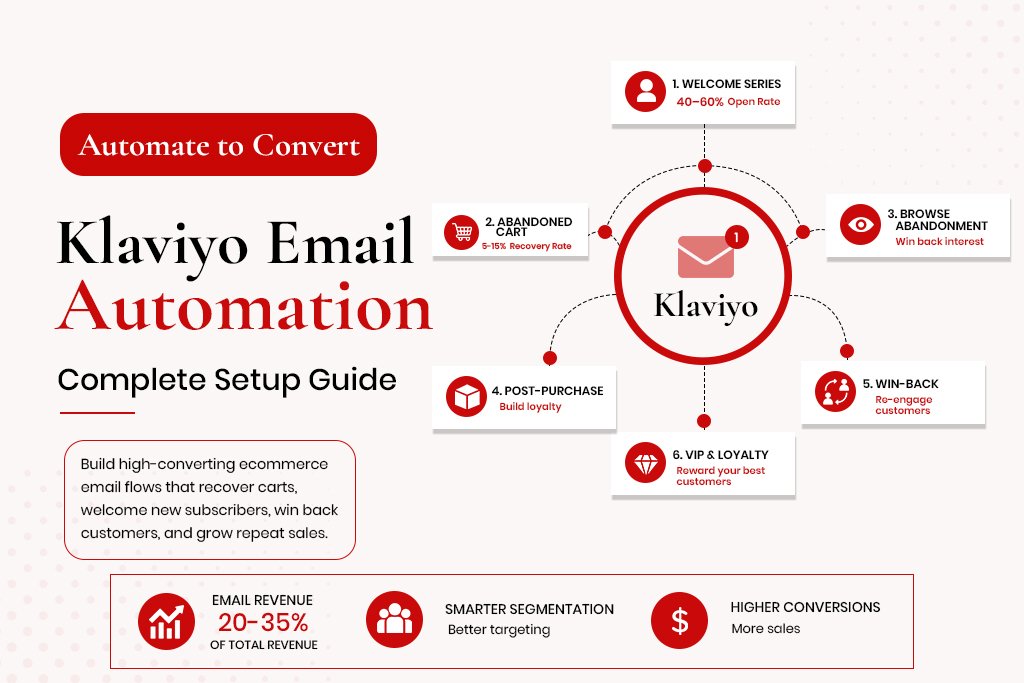
The 6 Essential Klaviyo Flows
Flow 1: Welcome Series
Triggered when someone subscribes for the first time. Open rates on welcome emails are typically 40-60%, compared to 20-25% for standard campaigns.
-
Email 1 (immediately): Warm welcome, deliver any offered discount or lead magnet
-
Email 2 (24-48 hours): Bestsellers, light social proof, one clear CTA
-
Email 3 (3-4 days): Address the most common objection before buying
-
Email 4 (5-7 days): Stronger offer or social proof
Flow 2: Abandoned Cart
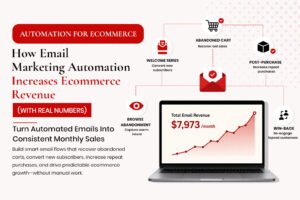
The highest-revenue flow for most stores. The average recovery rate from a well-structured flow is 5-15% of abandoned checkouts.
-
Email 1 (1 hour): Reminder with dynamic product blocks showing actual items left in cart
-
Email 2 (24 hours): Social proof on the abandoned product, reviews
-
Email 3 (72 hours): Final reminder with a small incentive – free shipping or 10% off
The 1-hour timing on Email 1 is important. Recovery rates drop significantly when delayed to 2-4 hours.
Flow 3: Browse Abandonment
Triggered when a visitor views a product page but does not add to cart. A single email sent 4-6 hours after browsing, showing the viewed product with social proof, recovers visitors who were interested but not ready.
Flow 4: Post-Purchase Series
-
Email 1 (immediate): Order confirmation
-
Email 2 (delivery day): Delivery check-in, satisfaction touchpoint
-
Email 3 (7-14 days): Request for a review
-
Email 4 (30-45 days): Cross-sell based on what they bought
Flow 5: Win-Back Campaign
-
Email 1: ‘We miss you’ personalised with their last purchase
-
Email 2: Incentive – free shipping, discount, early access
-
Email 3: Final goodbye – this reverse psychology email often outperforms the incentive email
Flow 6: VIP and Loyalty Tier
Once you have 6-12 months of purchase data, segment your top customers by lifetime value and treat them differently with early access and exclusive discounts.
Klaviyo Segmentation Strategy
-
Champions: purchased 3+ times in last 90 days, high AOV
-
Loyal customers: purchased 2-3 times, last purchase within 180 days
-
At-risk: were active, last purchase 180-270 days ago
-
Lost: no purchase in 365+ days, low engagement
-
High-intent browsers: visited 3+ product pages in 7 days, no purchase
-
New to brand: subscribed in last 30 days, no purchase
The Metrics That Tell You if Klaviyo Is Working
-
Revenue attributed to Klaviyo – should be 20-35% of total store revenue for a well-configured account
-
Flow revenue vs campaign revenue split – flows should generate more revenue than campaigns
-
Abandoned cart recovery rate – target 5-15%
-
List health – if more than 30% of your list is unengaged, deliverability will suffer
Frequently Asked Questions
How long does it take to set up Klaviyo properly?
A basic setup takes 8-12 hours of focused work. A full six-flow system with segmentation takes 20-30 hours.
Do I need all six flows from day one?
No. Start with welcome series and abandoned cart. Add browse abandonment and post-purchase next.
How do I avoid triggering spam filters?
Authenticate your sending domain, warm up before sending large volumes, maintain a clean list, keep complaint rate below 0.08%.
Can Klaviyo work for a B2B ecommerce store?
Yes, but the flow structure is different – longer purchase cycles and larger orders change the timing and messaging.