

WordPress vs Custom Web Development: Which Is Right for Your Project
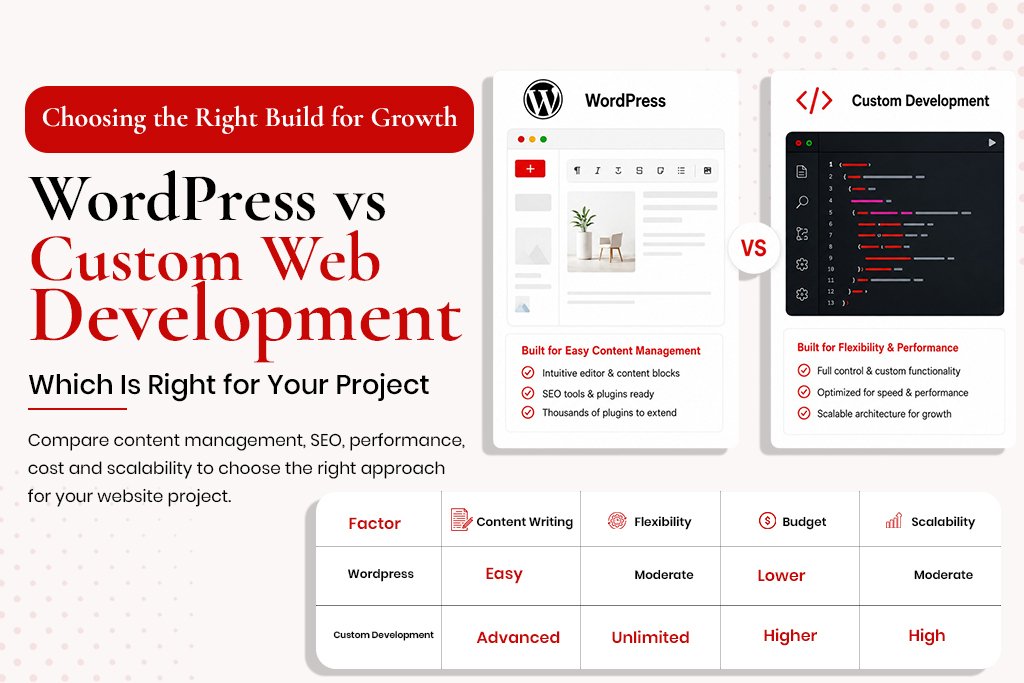
WordPress vs Custom Web Development: Which Is Right for Your Project This question comes up in almost every new website project conversation. WordPress or custom? CMS or bespoke build? The honest answer depends on factors specific to your project, your team, your budget and your growth plans. This guide gives an honest framework for the decision, covers the SEO implications of each, and explains when the choice is obvious versus genuinely close. What WordPress Actually Is WordPress evolved from a blogging platform into a full content management system powering around 43% of the web. It is open source, free to use, and supported by a massive ecosystem of plugins, themes and developers. Major brands including media publications and large retailers run on WordPress – the platform scales further than most businesses will ever need. What Custom Web Development Actually Means Custom development means building a website without a pre-existing CMS framework – writing code from scratch or using a front-end framework like React or Next.js with a custom back-end. This gives complete control but means every aspect must be built and maintained by a developer. WordPress Advantages Content Management Without Developer Involvement Non-technical team members can add blog posts, update pages and manage content without touching code – the biggest practical advantage for most businesses. Plugin Ecosystem WooCommerce, Rank Math, WP Rocket, Gravity Forms – mature plugins exist for almost every requirement, usually faster to implement than custom-coded equivalents. SEO-Friendly by Default With the Right Setup WordPress with Rank Math configured correctly is a strong SEO platform – automatic sitemaps, meta tags, schema and canonical tags all handled by the plugin. Developer Availability and Cost The WordPress developer pool is vast, making handoffs easier. WordPress is typically cheaper to build and maintain than a fully custom equivalent. WordPress Disadvantages Performance Challenges WordPress sites are frequently slow, usually self-inflicted through page builders, too many plugins, unoptimised images and cheap hosting. Security Surface Area WordPress is the most targeted CMS for hackers because it is the most widely used. The vulnerability surface mostly comes from outdated or poorly maintained plugins. Plugin Dependency A site with 30 plugins has 30 potential points of failure. Good practice involves keeping the plugin count low and reviewing necessity regularly. Custom Development Advantages Performance Ceiling A well-built custom site on a modern framework can achieve performance that WordPress struggles to match consistently. No CMS Constraints No architectural limitations imposed by a framework – the database schema, URL structure and content types are entirely defined by the development team’s decisions. Security A smaller attack surface than WordPress since there are no third-party plugins of unknown code quality. Custom Development Disadvantages Cost and Time Functionality that takes a WordPress developer 2 hours with a plugin can take a custom developer 20 hours from scratch. Content Management Requires CMS Work Non-technical content management on a custom site needs a separate headless CMS layer, adding cost and complexity. Developer Lock-In A custom-built site is harder to hand off – new developers must learn the bespoke codebase before making changes safely. SEO Implications of Each Choice Does the site produce clean, semantic HTML with proper heading hierarchy? Both can – both can also fail. Are meta tags, canonicals and schema implemented correctly? WordPress with Rank Math makes this easy; custom sites need explicit implementation. Does the site achieve good Core Web Vitals? Performance depends on implementation quality, not the platform. Is content manageable without developer involvement? WordPress wins here for most teams. The SEO risk is in poor implementation on either platform, not the platform choice itself. The Decision Framework Choose WordPress If: Non-technical team members will manage content Budget is under $15,000 for initial development Functionality requirements are standard You want flexibility to work with any WordPress developer Choose Custom Development If: The site is a web application with complex functionality CMS plugins cannot handle Maximum performance is required The data architecture is too complex for WordPress’s conventions You have an in-house team to maintain the codebase Frequently Asked Questions Can WordPress be as fast as a custom site? Yes, with a lightweight theme, caching plugin, fast host, locally hosted fonts, minimal plugins and optimised images – a well-built WordPress site can score 90+ on mobile PageSpeed. Is WordPress good for SEO? Yes, with Rank Math or Yoast configured correctly. The SEO capability is in the configuration, not the platform itself. What does a WordPress SEO development project involve? Architecture planning, theme selection or custom development, Rank Math configuration, schema implementation, Core Web Vitals optimisation, and sitemap setup.